If acronyms like FTTN, HFC and NTD make your eyes glaze over, you are not behind and you are not the problem. The industry talks like this on purpose, and it leaves a lot of good people feeling like their own home is a mystery. Here is the good news: you do not need to understand any of it to get a great result. Give us five minutes and you will know exactly what you have got, whether it is holding you back, and what (if anything) to do about it.
Start here: go and look at the box
Before any jargon, do this one thing. Find where the internet comes into your home. It is usually a box on a wall in a study, garage, laundry, hallway or living room, near a power point. Then look at three things:
What to look at to tell your connection apart
The box itself. Is there an nbn-branded box on the wall, a plain modem, or nothing at all except your own WiFi router?
The cable going into it. A thin fibre lead, a round screw-on 'TV-style' cable, a thin phone cable, or no cable at all (just power)?
The words on the box. Labels like OPTICAL, DOWNSTREAM, SIGNAL STRENGTH or MOBILE SIGNAL are dead giveaways, as you will see below.
That is the whole method. Now match what you saw to one of the types below.
FTTP: fibre all the way to your home

The nbn fibre connection box (FTTP)
A white nbn box on the wall, plugged into power, with a thin fibre lead. The labels read POWER, OPTICAL, ALARM and PORT. Your own router plugs into it. This is full fibre, the best connection the nbn offers.
How to spot it: an nbn-branded box mounted on an inside wall, plugged into a power point, with a thin fibre lead running into it. The lights are labelled POWER and OPTICAL (older units also show UNI-D and UNI-V ports underneath). Your own WiFi router plugs into it with a network cable. Common in newer estates south and west of Geelong.
What it means for you: this is as good as it gets. Fibre runs the whole way, so there is no old copper to slow you down or drop out. Since the September 2025 nbn changes, most FTTP homes on the old 100 plan now get up to 500 Mbps for the same price, with 750, 1000 and even 2000 Mbps tiers available.
Relax. You are on the best technology available. If your WiFi still feels slow, the connection is not the problem, your router or its placement almost certainly is. That is a different (and very fixable) job, and it is what our WiFi assessment is for.
Full detail: FTTP explained.
FTTN: fibre to the street, copper to your house

No nbn box, just a phone socket
The tell for FTTN: there is no nbn box on the wall at all. Your modem plugs into a small telephone wall socket like this one with a thin phone cable. The fibre stops at a cabinet in your street and old copper carries it the rest of the way.
How to spot it: there is no nbn box on your wall. Instead, your modem plugs straight into a small telephone wall socket with a thin phone cable. The fibre runs to a green or grey cabinet (a “node”) somewhere in your street, and the old copper phone line carries it the last stretch to your house. Common in established Geelong suburbs.
What it means for you: this is the slowest and least reliable nbn type, and how far your house sits from the node makes a real difference. It was left out of the September 2025 speed boost and cannot go past 100 Mbps. The upside is big though: many FTTN homes now qualify for a free upgrade to full fibre, and from 2027 the old copper starts getting switched off anyway.
This is the one most worth acting on. Pop your address into the nbn website or ask your provider whether a free full-fibre upgrade is available. It very often is.
Full detail: FTTN explained and the free fibre upgrade, start to finish.
FTTC: fibre to the kerb, a short copper run

The little nbn box on the phone socket (FTTC)
FTTC has a small white nbn 'connection device' that sits between your telephone wall socket and your modem. It is clearly labelled 'FTTC Network Connection Device'. Its lights turn solid blue when it is working.
How to spot it: a small white nbn connection device that sits between your telephone wall socket and your modem. It is often labelled “FTTC Network Connection Device”, and its lights turn solid blue when connected. The fibre runs to a pit at your kerb and only a few metres of copper finish the job.
What it means for you: much better than FTTN because the copper run is tiny. It still tops out at 100 Mbps though, and it did not get the September 2025 speed boost. The good news: from July 2026 the rules relaxed, so far more FTTC homes can now request a free upgrade to full fibre, even on a cheaper plan.
You are in good shape, and you are near the front of the queue for a free full-fibre upgrade. Worth asking your provider about it.
HFC: cable (the “TV cable” one)

The black nbn cable box (HFC)
nbn HFC uses a small black box (usually an Arris unit) fed by a round, screw-on 'TV-style' coaxial cable. Its lights are labelled POWER, DOWNSTREAM, UPSTREAM and ONLINE. A network cable then runs to your WiFi router.
How to spot it: a small black nbn box fed by a round, screw-on coaxial cable, the same kind of cable people remember from pay-TV. The lights are labelled POWER, DOWNSTREAM, UPSTREAM and ONLINE. A network cable runs from it to your router.
What it means for you: genuinely fast, supporting plans up to 1000 Mbps, and it got the September 2025 speed boost. Because the cable is shared with your neighbours, it can dip a little at busy times in the evening. It is not part of the free full-fibre upgrade push, because it is already quick.
Here is the catch for locals: nbn HFC is not really a Geelong thing. nbn built its cable network on the old Telstra and Optus pay-TV lines, and that cable was only ever laid in the big capital cities, not Geelong. So you will see the black nbn cable box in parts of Melbourne, Sydney and Brisbane, but around Geelong your nbn is almost always fibre-based (FTTP, FTTC or FTTN). If you have coaxial “cable” internet in Geelong, it is much more likely the iiNet/Vision network, which is the next section.
iiNet / Vision cable: Geelong’s own “cable” network
How to spot it: it also arrives on a round coaxial cable, so the wiring looks like HFC, but the key difference is on your bill and your plan. If your provider is iiNet (or TPG) cable and there is no mention of the nbn anywhere, you are on the Vision Network. It reaches parts of many Geelong suburbs, well beyond the city centre, but it is still street by street, so two neighbours can have different options.
What it means for you: this is a completely separate, privately built network (originally Neighbourhood Cable, later TransACT, now run by TPG’s Vision Network). It is a genuine nbn alternative in the streets it covers, often with less peak-time congestion than the nbn, but it is older technology (no gigabit) with a small footprint. Because it is not the nbn, you are not forced off it when the nbn arrives.
In Geelong, “cable” almost always means iiNet/Vision, not the nbn. They look the same on the wall and are completely different underneath.
Full detail: iiNet Cable in Geelong, the hidden alternative.
Fixed Wireless: internet beamed from a tower
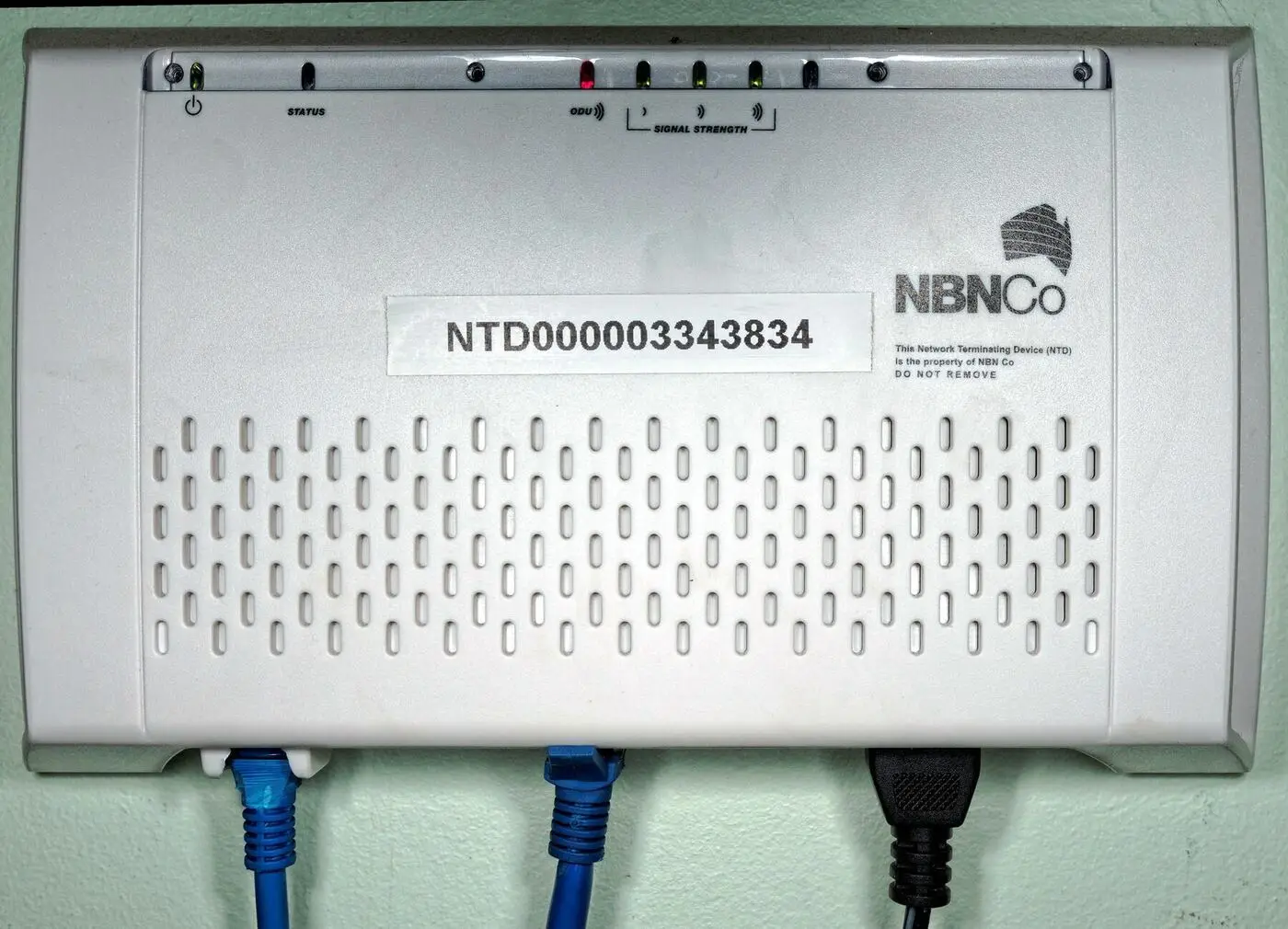
The fixed wireless box (with a roof antenna)
Fixed Wireless pairs an antenna on your roof with an indoor box like this. The giveaway is the labelling: it shows ODU and SIGNAL STRENGTH bars rather than the OPTICAL light you get on fibre.
How to spot it: two parts. Outside, a small antenna or dish on the roof (nbn calls it the ODU, or outdoor unit). Inside, an nbn box whose lights are labelled ODU and SIGNAL STRENGTH (bars), rather than the OPTICAL light you see on fibre. Common on the rural edges of Geelong, the Bellarine and the Surf Coast, where cable cannot reach.
What it means for you: it used to be the slow country cousin of the nbn, but a recent upgrade program changed that. Standard plans now reach up to 100 Mbps, with 250 and even 400 Mbps tiers across most of the footprint. Heavy weather, distance from the tower and busy evenings can still affect it.
It is far better than it used to be. If it feels slow, it is worth checking your signal strength lights and whether trees have grown up between you and the tower.
Mobile / 5G home internet: no fixed line at all

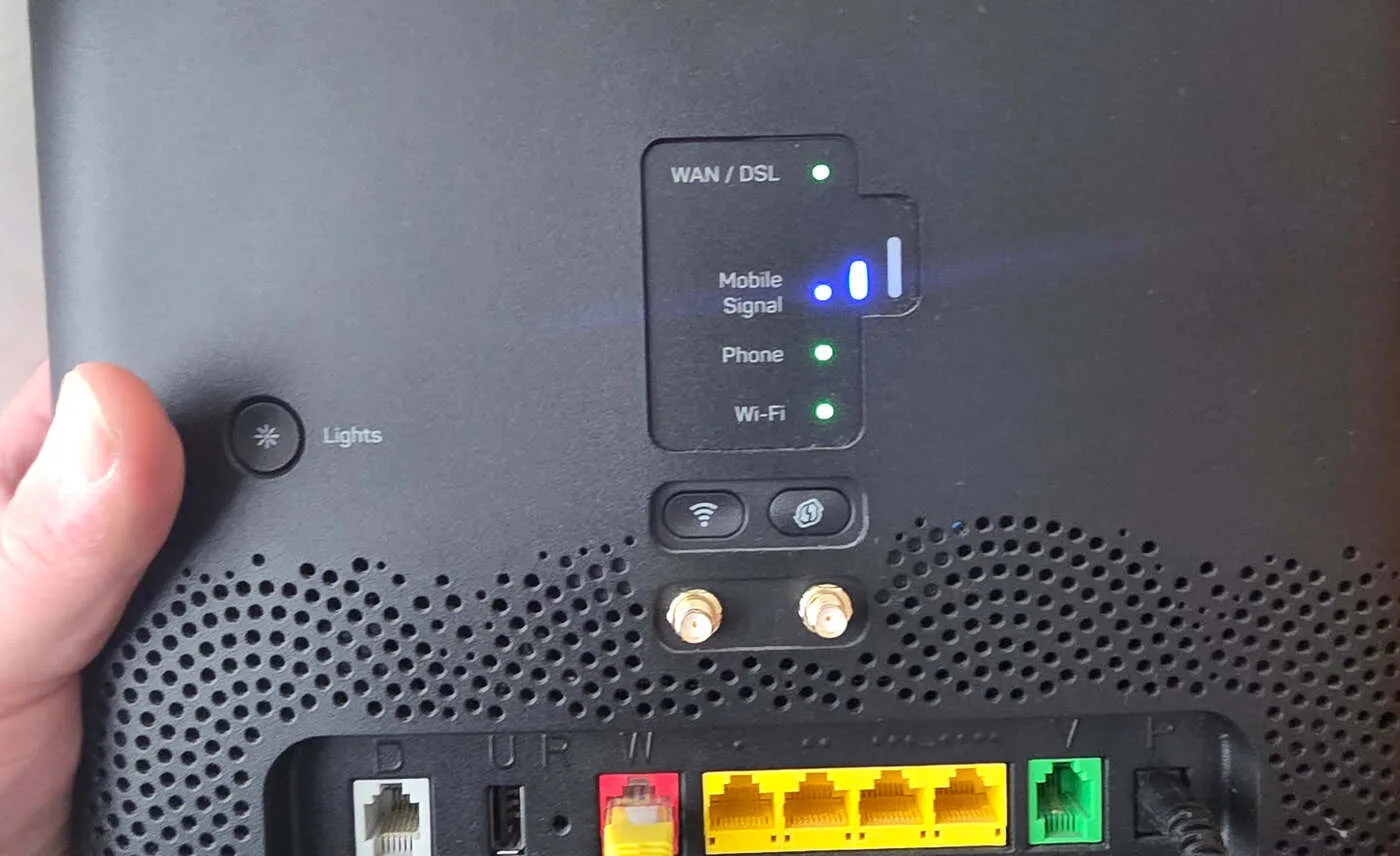
A modem with a 'Mobile Signal' light
Mobile and 5G home internet runs over the phone network instead of a fixed line. The tell is a MOBILE SIGNAL indicator (bars, like a phone) and a SIM card in the modem, with nothing plugged into a fibre, phone or cable socket.
How to spot it: a modem with a “Mobile Signal” indicator (bars, just like a mobile phone) and a SIM card in it, with nothing plugged into a fixed-line socket. It usually arrives in the post and you set it up yourself in minutes. Some fixed-line modems, like the Telstra Smart Modem 4, also carry a SIM as a backup for when the main line drops out.
What it means for you: home internet delivered over the 4G or 5G mobile network. It is quick to set up, needs no technician, and can be a great option where the fixed-line nbn is poor. The trade-off is that speed depends on the mobile signal and how busy the local tower is, especially in the evening. Plans from the big telcos generally run from around $60 to $95 a month.
Check your mobile signal at home first, in the exact spot the modem will live. Good signal means it can be excellent. Patchy signal means it will frustrate you.
Starlink: internet from space

The Starlink dish
Starlink is unmistakable: a sleek flat dish outside with a clear view of the sky, feeding a single white router indoors. No nbn box, no phone line, no cable. Just the dish and the router.
How to spot it: a sleek, flat satellite dish mounted outside with a clear view of the sky, feeding a single white router inside. There is no nbn box, no phone line and no cable involved.
What it means for you: satellite internet from thousands of low-orbit satellites, so it works almost anywhere you can see open sky. It is far faster and more responsive than the old-style satellite services, and brilliant for rural properties and genuine blackspots. The catch is cost: the kit is around $549 to buy (or about $15 a month to rent) and plans run from roughly $90 to $165 a month. If you already have solid nbn, it is overkill.
If Starlink is on your list, where the dish goes and how the WiFi is set up behind it matter as much as the service. Our Starlink installation page for Geelong and the Surf Coast explains when it makes sense and when the nbn is the smarter buy.
So what should you actually do?
If you are on FTTP, HFC or upgraded Fixed Wireless and your WiFi is fine, you are already on good infrastructure. The thing worth fixing is usually the WiFi inside the house, not the connection into it.
Here is the honest summary, with no sales pitch:
- On FTTP, HFC or newer Fixed Wireless? You are on good technology. Leave the connection alone. If the WiFi still frustrates you, that is a router and coverage issue, not a connection issue.
- On FTTN or FTTC? This is where a free upgrade to full fibre is often available and genuinely worth taking. Ask your provider or check your address on the nbn website.
- On mobile/5G or Starlink? These are usually deliberate choices for a reason (poor fixed-line, rural, renting, wanting no contract). Just make sure the reason still holds.
- Not sure which you have, even now? That is completely fine. This stuff is genuinely confusing.
Once you know what you have got, the next question is whether you are getting it. That is the bit our $199 assessment measures, room by room.
You do not have to become an expert. You just have to know enough to stop feeling lost, and to ask the one right question.
Still not sure? Send us a photo
The fastest way to know for certain is to text a photo of the box on your wall to 0489 998 445. We will tell you exactly what you have got, whether it is holding you back, and whether there is a free upgrade waiting for you. No charge, no jargon, no pushy follow-up. We would rather you knew.
If the connection turns out to be fine and the WiFi is the problem, book a WiFi assessment and we will measure it room by room.
Related reading
- The free nbn fibre upgrade, start to finish — if you are on FTTN or FTTC
- FTTP explained — the best connection type
- FTTN explained — what a lot of Geelong is still on
- iiNet Cable in Geelong — the local “cable” alternative to the nbn
- How to pick the right internet plan for your address
- Does your nbn provider actually matter?
Official resources
- nbn Address Checker — tells you the exact technology at your address
- nbn upgrade program — check if a free full-fibre upgrade is available
Common questions
What is the quickest way to tell what internet connection I have?+
Look at the box your internet plugs into. A white nbn box with an OPTICAL light is fibre (FTTP). No nbn box and a modem in a phone socket is FTTN. A small white nbn box on the phone socket is FTTC. A black box on a round screw-on cable is HFC (or iiNet/Vision cable in Geelong). A roof antenna with an ODU/SIGNAL STRENGTH box is Fixed Wireless. A modem with a SIM and a Mobile Signal light is mobile/5G. A dish outside is Starlink. If you are still unsure, text a photo of your box to 0489 998 445 and we will tell you.
Is nbn HFC available in Geelong?+
Generally no. nbn built its HFC cable network on the old Telstra and Optus pay-TV lines, which were only laid in the major capital cities, not Geelong. So around Geelong your nbn is almost always fibre-based (FTTP, FTTC or FTTN), plus Fixed Wireless on the rural fringes. If you have coaxial 'cable' internet in Geelong, it is far more likely the iiNet/Vision network, which is separate from the nbn.
Is iiNet cable the same as nbn HFC?+
No. They both arrive on a round coaxial cable, so they look similar on the wall, but they are completely different networks. nbn HFC is part of the national broadband network. iiNet/Vision cable in Geelong is a separate, privately built network (originally Neighbourhood Cable) that covers parts of many Geelong suburbs (street by street, not everywhere) and is not the nbn.
I am on FTTN or FTTC. Should I upgrade to full fibre?+
Usually yes, especially if the upgrade is free, which it often is. FTTN in particular is the slowest and least reliable nbn type and cannot go past 100 Mbps. Check your address on the nbn website or ask your provider whether a free full-fibre upgrade is available. From July 2026 many more FTTC homes became eligible too.
My connection type is fine but my WiFi is still slow. Why?+
The connection into your home and the WiFi inside it are two different things. Even on the best fibre, a poorly placed or older router will leave you with weak WiFi in parts of the house. That is the most common reason people call us, and it is very fixable, usually without touching your connection at all.
Image credits: FTTC connection device photo by Ariconte, Wikimedia Commons (CC BY-SA 4.0). Starlink dish photo, Wikimedia Commons (CC0). Other photos taken by Why Oh WiFi on the job.