If your home still runs on the older copper NBN, there is a good chance you can now upgrade to full fibre for nothing. It is a genuinely good deal. But the process trips people up in a few predictable places, and one of them can leave you with worse WiFi than you started with. Here is the whole thing, start to finish, in plain English.
If you are not certain whether you are on copper, fibre or something else, start here: how to tell what type of internet connection you have. It walks you through identifying your setup from the box on your wall in about a minute.
What we actually mean by “the upgrade”
Most homes around Geelong were connected to the NBN using existing copper phone lines for the last stretch into the house. That is FTTN (fibre to the node) or FTTC (fibre to the curb). The fibre runs to a cabinet in your street or a pit at your kerb, then copper carries it the rest of the way. Copper is the weak link. It is distance sensitive, it degrades, and it drops out.
The upgrade replaces that last copper run with a proper fibre line, all the way to a box on your wall. That is FTTP (fibre to the premises), the best connection type the NBN offers. No copper, no distance penalty, and plenty of headroom for the faster speed tiers that arrived in September 2025.
First, what is this box everyone keeps talking about?
When people mention “the NBN box” or “the NTD,” they mean the same thing: the small connection box the fibre plugs into inside your home. NTD stands for Network Termination Device. It is where the NBN network ends and your home begins.
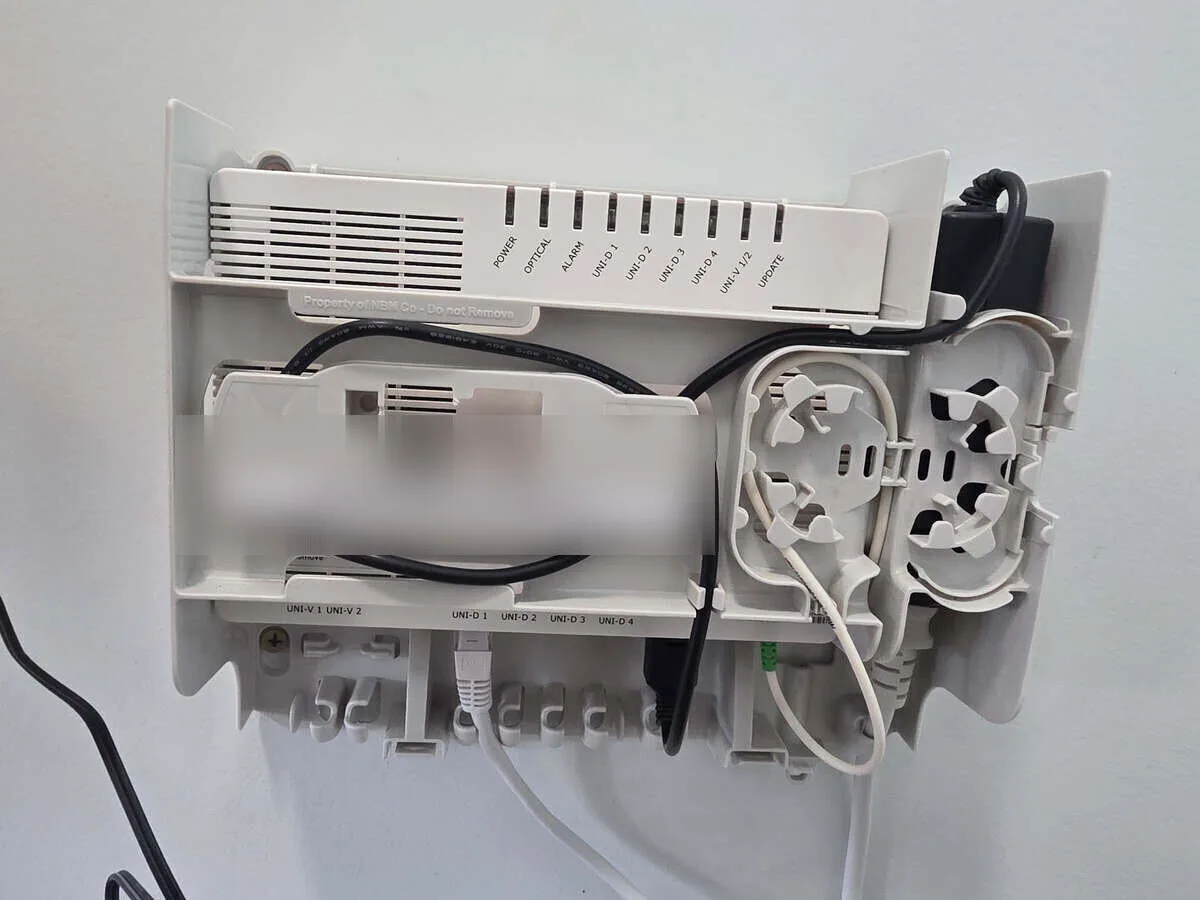
The connection box (NTD)
Your router plugs into one of the UNI-D ports along the bottom with an ethernet cable. The lights on the front tell you the fibre service is up.
A few things worth knowing about it:
- It needs power. The box runs off a normal wall socket, so it has to sit near a power point.
- Your router plugs into it. A short ethernet cable runs from a port on the box (a UNI-D port) to your router. The router is what actually creates your WiFi.
- It has status lights. Handy for a quick health check, so it helps to have it somewhere you can actually see, not buried in a cupboard.
That last point matters more than it sounds, which brings us to the part nobody warns you about. First though, the basics.
Is your place eligible?
More than 700,000 homes and businesses across Victoria are already eligible for a free full fibre upgrade, and NBN keeps adding more suburbs in tranches.
Big parts of our patch are already on the list. NBN has named these local suburbs among those eligible to upgrade from copper to full fibre:
Anglesea, Barwon Heads, Belmont, Corio, East Geelong, Geelong, Geelong West, Grovedale, Hamlyn Heights, Highton, Lara, Leopold, Manifold Heights, Marshall, Moolap, Newtown, Norlane, North Geelong, North Shore, Ocean Grove, Point Lonsdale, South Geelong, Torquay, Wandana Heights and Waurn Ponds.
The only way to know for certain about your exact address is an address check. Your phone and internet provider can run one, or you can check on the NBN website. Eligibility is set street by street, and sometimes house by house, so your neighbour being eligible is a good sign but not a guarantee.
Do not give up on it. NBN is expanding the program in stages, and from July 2026 the rules loosen further for homes on fibre to the curb. It is worth re-checking every few months, or we can keep an eye on your address for you.
How you actually get it (the bit people get wrong)
Here is the thing that confuses almost everyone. You cannot order the upgrade from NBN directly. NBN is a wholesaler. They do not sell to you.
Instead, you order it by signing up to an eligible plan (usually one of the faster speed tiers) with a participating phone and internet provider. That provider then places the upgrade request with NBN on your behalf. In NBN’s own words, eligible customers “place an order with a participating phone and internet provider and purchase a plan based on our eligible higher wholesale speed tiers to upgrade to FTTP.”
The upgrade, step by step
Check your address is eligible.
Choose a provider and an eligible plan, and tell them you want the fibre upgrade. They lodge it with NBN.
NBN confirms, then books a technician visit at a time that suits you.
The technician installs the new fibre and connection box. Usually two to four hours.
You plug your router into the new box, confirm it is working, and make sure the old service is cancelled.
This is also the first place we can take the load off you. Choosing the right provider and speed tier is not obvious, and the difference between a good plan and a poorly matched one is real money over a couple of years.
Book a WiFi assessment before the upgrade and we will work out where the connection box should go and how the WiFi will reach the rest of the house.
What happens on the day
An NBN approved technician comes to your home. A few things are worth knowing before they arrive:
- Someone over 18 has to be home for the whole appointment. The technician needs a responsible adult to agree to, and sign off on, where and how the equipment goes in.
- Your internet keeps working. The new fibre is installed alongside your existing copper service, not instead of it. NBN describes it as installing the fibre connection “in parallel to your existing” connection. Nothing gets cut off on the day.
- It usually takes two to four hours, sometimes longer depending on the run from the street.
- They install two things: a small utility box on an outside wall, and the connection box (NTD) on an inside wall, with fibre run between them.
Nothing happens without your say-so. As NBN puts it, “nothing will happen without your consent,” and the technician needs your official sign-off before they start.
Where the box goes, and why it matters more than you would think
This is the part almost nobody thinks about until it is too late, and it is a common reason people call after an upgrade.
The technician’s job is to get you connected safely and quickly. Left to run to their own convenience, that often means the connection box lands wherever is easiest for them: the corner of a bedroom, the laundry, the garage, or a spare room at the far end of the house. Technically it works. In practice, if your router ends up tucked in a back corner, your WiFi now has to fight its way through the whole house from the worst possible starting point.

Tucked in the corner of a bedroom
This one sits in the corner of a master bedroom, about as far from the living areas as the house allows and nowhere near where the family actually uses the internet. It is also an eyesore, with the modem left on the floor and cables run across the carpet. The box went where the cabling was quickest to reach, not where the WiFi needed to start.

Boxed in behind furniture
Tucked low, behind a wardrobe, out of sight. Out of sight also means a weak signal and no easy way to check the status lights.
Here is what you are actually entitled to, factually:
- You get consulted, and you can say no to a location. The technician cannot proceed without your consent and signature on where the boxes go. That is a real right, not a favour.
- Within the standard rules, where the box goes is a conversation. The connection box has to sit within about 12 metres of the outside utility box, on an internal wall, near a power point, somewhere accessible. Inside that envelope, you can nominate where you would prefer it.
- If you want it somewhere further, you can, but it becomes a non-standard install. You would supply a cable pathway (up to 40 metres) run by a registered cabler, at your cost, and the job may not finish that same day.
- The router is not fixed to the box. Even if the box has to go in an awkward spot, the router can live elsewhere on a longer ethernet lead. That simple move solves a lot of problems.
The upgrade is free. Where they put the box is free too. Getting that decision right is the difference between whole-home fibre and a fast connection trapped in your garage.
Have a think about where the box should go: somewhere central, near a power point, close to where your router can sit and reach the rooms that matter. Then say so on the day. If you would rather not have that conversation with a technician on a clock, this is exactly the sort of thing we are there for.
Where that box lands decides where your WiFi starts from, and you only get to choose once. If you want the placement worked out before the technician arrives, book an assessment first.
What happens to your old connection
Because the fibre goes in alongside your copper, your old service does not switch off automatically the moment the technician leaves. That sounds convenient, and it is, but it hides a trap.
Your old plan is not always cancelled for you. If you stay with the same provider, many will disconnect the old copper service once the new fibre is active. If you switch providers, or if your provider does not tidy it up, the old plan can keep running, and keep billing, in the background. NBN’s own advice is blunt about it: “check with your original provider that your plan on the original technology (FTTN or FTTC) has been cancelled, so that you can avoid being charged for services on both technologies.”
Once your new fibre is up and confirmed working, contact your old provider and make sure the old plan is closed. If you are on a month-to-month plan (as many are), there is usually no exit fee, so this is just a phone call, not a penalty.
What it actually costs
The headline is true: the standard installation is free. NBN covers “free installation of nbn supplied equipment only.” What that means in practice:
- The fibre and the connection box: free to install, as a standard job.
- The plan: you do need to be on an eligible plan, usually a faster speed tier, which may be a step up from what you pay now. That is the real cost of entry, and it also gets you a much better connection.
- Your router: your provider will supply one, or you can use your own. Most modern routers work fine, plugged into the box by ethernet. If yours is more than about five years old, it may be worth refreshing to get the full benefit of fibre speeds.
- Non-standard extras: if you want the box somewhere that needs extra cabling, or you want the WiFi set up properly across the home afterwards, those are separate. The upgrade itself is still free.
Why this is worth doing now, not later
This is not a forever option. The old copper network is being retired, so the upgrade is shifting from a nice-to-have to the way everyone will connect.
A few things have lined up that make now a sensible time:
- Speeds jumped in September 2025. The faster tiers were boosted, so fibre gives you far more than it used to for a similar spend.
- Eligibility is widening. From July 2026, more homes qualify, and NBN keeps adding suburbs.
- Copper is on the way out. Providers begin sending upgrade notices from July 2027, and the old copper services start being switched off from January 2028. Doing it on your own terms now beats being pushed later.
How we can help (and why people ask us to)
You can absolutely do all of this yourself. Plenty of people do. But there are a few points where a hand makes the difference between a smooth upgrade and a frustrating one, and that is where we come in:
- We coordinate the whole booking. We check your eligibility, help you choose a provider and the right speed tier, and get the upgrade lodged, so you are not stuck on hold working out what to order.
- We can be there for the technician visit. This is the big one. We are on site to make sure the connection box goes somewhere that works for your home, not just wherever is quickest, so you never end up with fibre trapped in the garage.
- We set up your WiFi around the new connection. Once the fibre is in, we position and configure everything so the speed actually reaches every room, and prove it before we leave.
Free fibre is only half the win. The other half is making sure your home is set up to actually use it.
The place to start is a WiFi assessment at your home, before the technician is booked.
Book a WiFi assessment or call 0489 998 445
Common questions
Common questions
Is the NBN fibre upgrade really free?+
The standard installation of the fibre and the connection box is free. You do need to be on an eligible plan, usually one of the faster speed tiers, so there may be a change to what you pay your provider each month. Non-standard work, like extra cabling to a preferred box location, is not covered.
Do I order the upgrade from NBN?+
No. NBN is a wholesaler and does not sell to you directly. You take up an eligible plan with a participating phone and internet provider, and they arrange the upgrade with NBN on your behalf.
Will my internet be down during the upgrade?+
No. The new fibre is installed alongside your existing copper connection, so your current service keeps working right through the appointment. You switch over to the new connection once it is in and confirmed.
Does someone need to be home?+
Yes. A person over 18 must be present for the whole visit, which is usually two to four hours. They need to consent to, and sign off on, where and how the equipment is installed.
Can I choose where the connection box goes?+
You get a genuine say. The technician cannot install it without your consent. Within NBN's standard rules (near a power point, within about 12 metres of the outside box, on an accessible internal wall) you can nominate your preferred spot. A location outside those rules becomes a paid, non-standard install.
Do I need to cancel my old plan myself?+
Often, yes. Your old copper plan is not always cancelled automatically, especially if you switch providers. Once your fibre is working, confirm with your old provider that the previous plan is closed, so you are not billed for two services at once.
Will my existing router work?+
Usually. Your router plugs into the new connection box with an ethernet cable. Most modern routers are fine. If yours is more than about five years old, refreshing it can help you get the full benefit of fibre speeds.
We look after NBN fibre upgrades across Geelong, the Bellarine and the Surf Coast, from checking your address to standing beside the technician on install day. If you would like the whole thing done properly, with your WiFi sorted around it, get in touch and we will take it from here.