8 rooms
Measured on the day
This is the document a $199 visit ends with, built exactly the way every customer report is built: your house drawn with the measured speed in every room, an equipment list with a verdict against each item, the reasoning in plain words, and the honest notes about things outside our trade. Five pages. Read it here or take the PDF.
The house and the figures below are a composite, not a real customer. We do not publish anybody's home, and the numbers are invented to be internally consistent with a 500 plan and a single WiFi unit at the front of a single-storey house. Everything else, from the layout to the wording, is exactly what you would receive.
Nothing to pay when you book. $199 inc GST on the day. Free reschedule with 24 hours' notice.
|
Geelong’s WiFi Specialist
|
0489 998 445 hello@whyohwifi.com.au whyohwifi.com.au ABN 93 700 631 974 · ACN 700 631 974 |
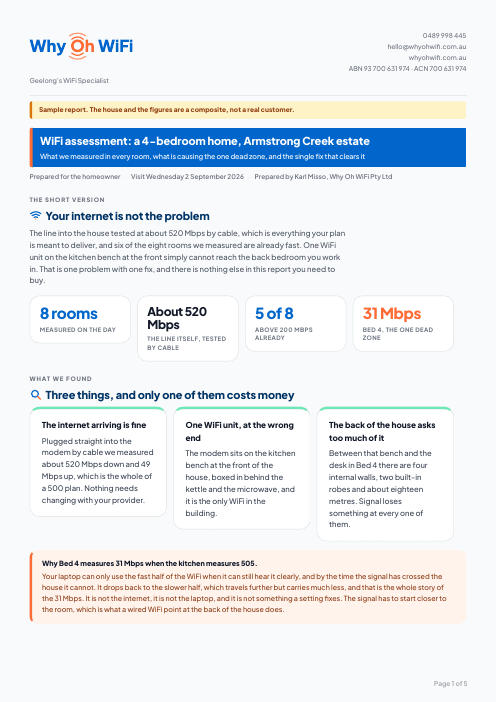
The line into the house tested at about 520 Mbps by cable, which is everything your plan is meant to deliver, and six of the eight rooms we measured are already fast. One WiFi unit on the kitchen bench at the front simply cannot reach the back bedroom you work in. That is one problem with one fix, and there is nothing else in this report you need to buy.
Plugged straight into the modem by cable we measured about 520 Mbps down and 49 Mbps up, which is the whole of a 500 plan. Nothing needs changing with your provider.
The modem sits on the kitchen bench at the front of the house, boxed in behind the kettle and the microwave, and it is the only WiFi in the building.
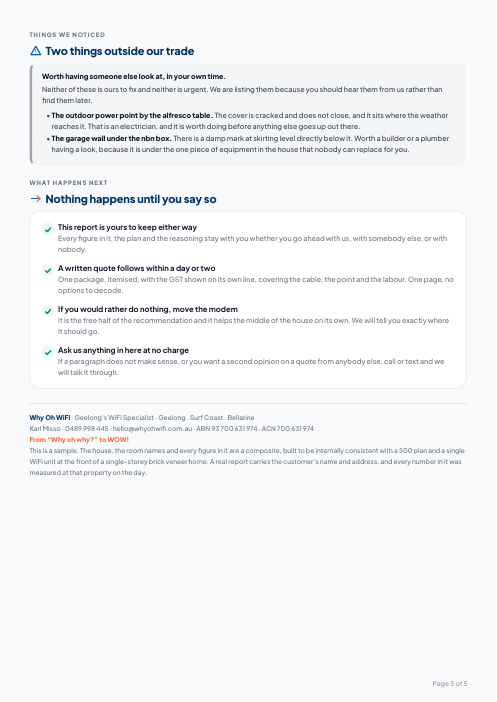
Between that bench and the desk in Bed 4 there are four internal walls, two built-in robes and about eighteen metres. Signal loses something at every one of them.
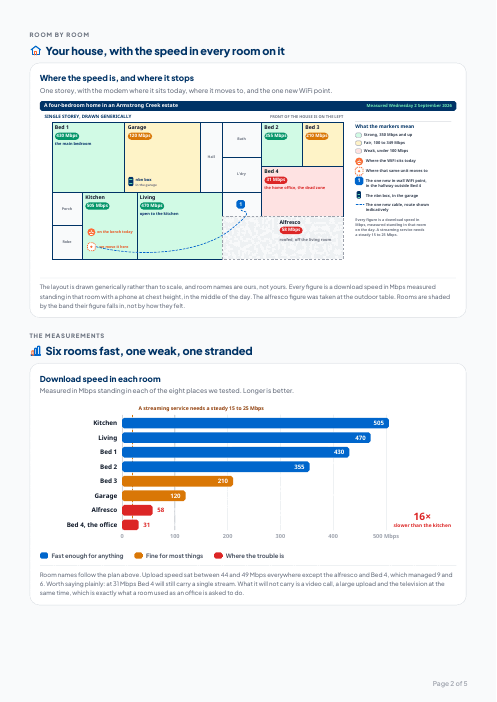
One storey, with the modem where it sits today, where it moves to, and the one new WiFi point.
The layout is drawn generically rather than to scale, and room names are ours, not yours. Every figure is a download speed in Mbps measured standing in that room with a phone at chest height, in the middle of the day. The alfresco figure was taken at the outdoor table. Rooms are shaded by the band their figure falls in, not by how they felt.
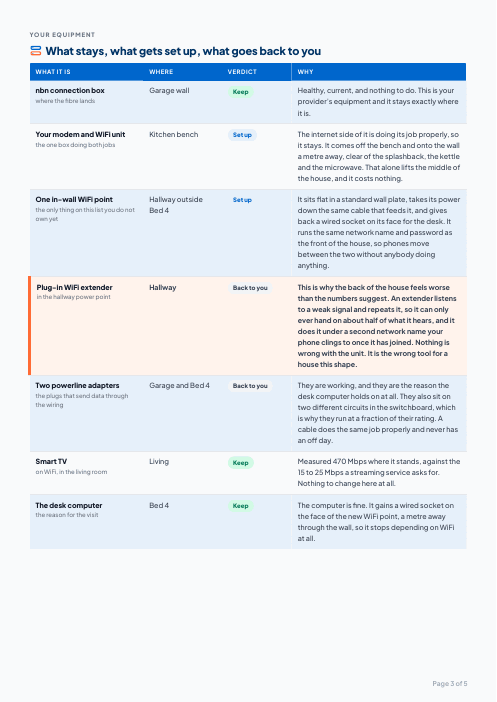
Measured in Mbps standing in each of the eight places we tested. Longer is better.
Room names follow the plan above. Upload speed sat between 44 and 49 Mbps everywhere except the alfresco and Bed 4, which managed 9 and 6. Worth saying plainly: at 31 Mbps Bed 4 will still carry a single stream. What it will not carry is a video call, a large upload and the television at the same time, which is exactly what a room used as an office is asked to do.
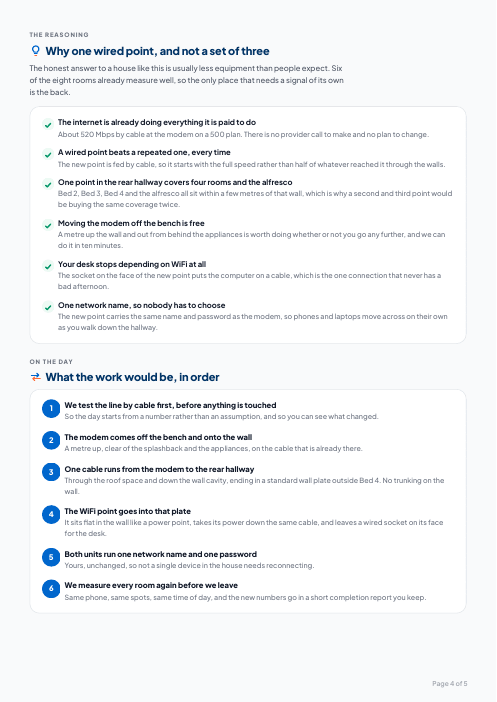
| What it is | Where | Verdict | Why |
|---|---|---|---|
| nbn connection boxwhere the fibre lands | Garage wall | Keep | Healthy, current, and nothing to do. This is your provider’s equipment and it stays exactly where it is. |
| Your modem and WiFi unitthe one box doing both jobs | Kitchen bench | Set up | The internet side of it is doing its job properly, so it stays. It comes off the bench and onto the wall a metre away, clear of the splashback, the kettle and the microwave. That alone lifts the middle of the house, and it costs nothing. |
| One in-wall WiFi pointthe only thing on this list you do not own yet | Hallway outside Bed 4 | Set up | It sits flat in a standard wall plate, takes its power down the same cable that feeds it, and gives back a wired socket on its face for the desk. It runs the same network name and password as the front of the house, so phones move between the two without anybody doing anything. |
| Plug-in WiFi extenderin the hallway power point | Hallway | Back to you | This is why the back of the house feels worse than the numbers suggest. An extender listens to a weak signal and repeats it, so it can only ever hand on about half of what it hears, and it does it under a second network name your phone clings to once it has joined. Nothing is wrong with the unit. It is the wrong tool for a house this shape. |
| Two powerline adaptersthe plugs that send data through the wiring | Garage and Bed 4 | Back to you | They are working, and they are the reason the desk computer holds on at all. They also sit on two different circuits in the switchboard, which is why they run at a fraction of their rating. A cable does the same job properly and never has an off day. |
| Smart TVon WiFi, in the living room | Living | Keep | Measured 470 Mbps where it stands, against the 15 to 25 Mbps a streaming service asks for. Nothing to change here at all. |
| The desk computerthe reason for the visit | Bed 4 | Keep | The computer is fine. It gains a wired socket on the face of the new WiFi point, a metre away through the wall, so it stops depending on WiFi at all. |
The honest answer to a house like this is usually less equipment than people expect. Six of the eight rooms already measure well, so the only place that needs a signal of its own is the back.
Prefer it as a file? Download the PDF.
$199 flat, GST included. Every room measured, your house drawn, and the report is yours to keep either way.
Nothing to pay when you book. $199 inc GST on the day. Free reschedule with 24 hours' notice.